Showing posts with label #LearnTechnology. Show all posts

Wednesday, October 18, 2017

How to Take (good) Pictures with your Smartphone (Encore #110)

If you have a smartphone but haven't explored the camera options, this episode is for you. Maybe you think that a smartphone can't take good pictures? We took all the pictures from our Europe vacation with either an iPhone or an Android. Take a look and see what you think.  In this encore episode we start with how to take a photo, take a selfie, take a video, then we show how to set focus and exposure, turn the flash on/off, take a panorama and more. This episode was recorded live on Sunday, February 12, 2017. To be notified of live shows, subscribe to our YouTube channel and be sure to click the bell for notifications.
  1. Opening Tip: Finding Apps on your Phone. 
  2. Beginner’s Lesson: Photography Essentials. 
  3. Closing Tip: Valentines Day Photo Frames
Geeks on Tour members: get your class notes here. You might want to print them out and then join with some friends to take the class. Just play the parts of interest to you by using the timeline links in the class notes, pause the video and experiment on your own device. Then take the review questions at the end and see how you did.
NEW!! Facebook Live event to field Q&As about this episode.We will be live on Thursday, 10/19 at 5pm Central. RSVP here.
Continue your Education with Geeks on Tour by subscribing to our Newsletter!

Wednesday, August 23, 2017

How to Organize iPhone or Android Home Screens #52

This episode of What Does This Button Do was streamed live on Sep 20, 2015.
Are the icons on your homescreens scattered all over the place? Would you like them to be organized according to how you use them? Or would you like them to be simply alphabetical. Whatever you like, your screens are completely customizeable, this encore episode will show you how. Quick Tip: Google Photos Auto Edit, App: Roadtrippers

Geeks on Tour members: get your class notes here. You might want to print them out and then join with some friends to take the class. Just play the parts of interest to you by using the timeline links in the class notes, pause the video and experiment on your own device. Then take the review questions at the end and see how you did.


Continue your Education with Geeks on Tour by subscribing to our Newsletters!

Wednesday, August 9, 2017

How do you Right-Click on a Touch Screen? #75

This episode of What Does This Button Do was streamed live on March 27, 2016. 
LongPress on a touch screen is like a Right-Click. LongPress means the same thing as Touch and Hold. It’s not pushing on the screen, just touch the screen then leave your finger touching the screen and see if something happens. In this encore episode, you will learn a lot of tricks on both Android and iOS devices using LongPress. From getting special characters on your keyboard, to copy/paste, to saving places on a map and more.
Geeks on Tour members: get your class notes here. 

    1. Tip o Week: Airplane Mode to Test whether an App uses Data
    2. Beginner’s Lesson: How to “Right-Click” on your Smartphone
    3. App o week: Drippler


  1. When you touch the screen and hold your finger there, we call that a ______________.
  2. To get the emoji keyboard, do what?
  3. T/F: Everything you can do on a computer with Right-Click can be done on a phone.
  4. To copy text, you must select it first, you do this by _____________________.
  5. Long pressing on a Map will do what? _________________________
  6. Long pressing on an iPhone’s home button will do what? _______________________


Continue your Education with Geeks on Tour by subscribing to our Newsletters!

Wednesday, June 28, 2017

#118. Smartphones and Travel in Europe

This episode was streamed live on 6/25/17. We just returned from a month of wandering in Europe and we couldn't have done it without our smartphones. Where to go? What to do? Where to stay? How to get there? How to speak the language? What to eat?
We usually use our Smartphones for Maps, Photos, and Social Networking while traveling in an RV in the US. Smartphones are invaluable when traveling in Europe. We used them for everything from managing currencies, translating languages, traveling by rail, and finding amazing lodging accommodations. You have to be connected. Let us show you how we did it. 

And ... check out our photo album from traveling in Italy, Croatia, Slovenia, and Berlin. We'll be sharing our photo taking, editing, and organizing secrets in next episode. (spoiler: it's all about Google Photos!)

For Geeks on Tour members, here are the show notes for #118


Continue your Education with Geeks on Tour by subscribing to our Newsletters!

Tuesday, June 13, 2017

Managing your Phone's Battery #69

This episode was streamed live on February 7, 2016. This month, while we've been visiting beautiful places in Italy, Slovenia, and Croatia - it has been so important to keep our phones charged! We don't want to miss any of those photos! This episode is about understanding what is using your battery and how to keep it going longer. You will learn how to find out what is using your battery and what external batteries we recommend. 

It's your choice to use your battery less, or get more batteries! You'll learn both in this encore episode of What Does This Button Do? 
      1. Tip of the day: Android Touch Key Lights, iPhone Flashlight
      2. Beginner’s Lesson: Managing your Battery
      3. App of the day: NFL
      For Geeks on tour members, here are the detailed show notes with links for episode 69,

      Review Questions:

      1. Name 3 of the 5 Radios in a Smartphone
      2. How do you turn all radios off at once?
      3. T/F You should always drain the battery completely before charging
      4. To see what Apps are using battery, you can go to Settings and then ___________________
      5. For most people, the biggest user of battery is _______________________
      6. T/F Keeping your system and Apps up to date will help with greater battery life


      Continue your Education with Geeks on Tour by subscribing to our Newsletters!

      Wednesday, April 12, 2017

      #114 Forgot Your Password? How to Recover Your Account

      This episode was streamed live on April 9, 2017. To be notified when we are live, subscribe to our YouTube channel and click the little bell for notifications.
      We've seen several people recently struggling with the fact that they can't use their phone properly because they've forgotten the password to their primary account. This episode demonstrates why the account and password are so important and the steps you can take to ensure that you can recover your account when (not IF!) you forget your password.
      We also have the normal beginning Tip and ending App:
      • Quick Tips: Viewing Websites on Smartphones
      • Beginner’s Lesson: Forgot your Password? How to Recover your Account.
      • App of the Week: NPR One

      For Geeks on Tour Members only: Here's your Show Notes We recommend printing them out, then watch the show with friends and LEARN!


      Continue your Education with Geeks on Tour by subscribing to our Newsletters!

      Wednesday, March 15, 2017

      How to Free Up Space on your Smartphone

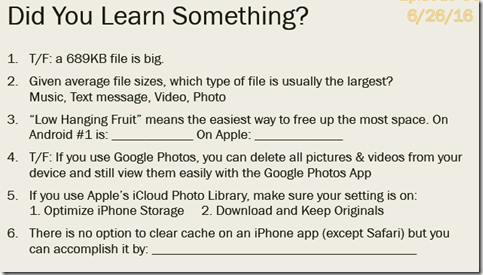
      This episode was streamed live on June 26, 2016. When your phone gets full, a lot of things stop working! First we explain how to find out what is taking up the space. It's your job to clean it out. There are a couple of things that are easy to delete and usually free up quite a bit of space. We call these the “low hanging fruit.” Then we have lots of tips for a variety of techniques for keeping your phone clean.
      1. Tip o Week: Straighten Horizons
      2. Beginner’s Lesson: Free up Space on your phone
      3. App o week: Pay By Phone
      We did not do a live Button Show this week because we were teaching a different class ... one on Blogging. We turned on Facebook Live Streaming for that class, you can watch it here.


      Continue your Education with Geeks on Tour by subscribing to our Newsletters!

      Wednesday, January 11, 2017

      #105 Teaching your Friends and Family, Guest: Abby Stokes

      This episode was live on Sunday, January 8, 2017. To be notified of live shows, subscribe to our YouTube channel.
      • Opening Tip: Deleting apps is very different in Android vs iPhone
      • Beginner’s Lesson: Teaching Tips for helping your new-to-smartphones friends and family
      • Ending Tip/App: RVDumpSites


      Review Questions. Leave comments with your questions.
      1. Where can you find the best button shows for Beginners?
        _____________________________________
      2. A family member is always the best teacher
        True    False
      3. When teaching, whose hands should be on the device?
        __Teacher    __Learner
      4. What is the best length of time for a lesson?
        _______________________________________
      5. What are the 3 steps for teaching something important?
        1. ________________  2._____________  3._______________
      6. To learn more from our guest, Abby Stokes, go to her website
        ____________________________________________
        AskAbbyStokes.com


      Wednesday, January 4, 2017

      Web Browsing on Mobile Devices #28

      We didn't do a live show this week, so we searched thru our archives for something useful and came up with Episode 28 which originally streamed live on January 25, 2015. There are some really useful tips and the Beginner's Lesson is just as valid today as it was then. In fact, by watching it I learned some things I had forgotten! After watching it, how did you do with the review questions? Leave us comments ok? The show starts with some talk and videos of where we were at the time in Quartzsite AZ. To see the original videos, click here. To skip the opening, go to the 6min 40 second point.
      1. Quick Tips: Icon Glossary, Emailing your Lat/Lon location. 
      2. Beginner’s Lesson: Web Browsing 
      3. App o Week: TuneIn Radio 
      For the best viewing, be sure to click the FullScreen button in the lower right corner
      Show Notes and Links (for members only) Not a member? Join now.
      Show Notes and Links $.99 for non-members
       
      Review Questions:
      1.To Browse to a website, you need a browser: Name 2
      2.You can have several websites open at one time in different _________.
      3.How can you go directly to a website rather than getting search results?
      4.How can you save a website as an icon on your home screen – like an app?
      5.Bookmarks are most useful for websites that you use All the time? Or Occasionally?

      Continue your Education with Geeks on Tour by subscribing to our Newsletters!